
Claude Code on GitHub Codespaces vs Machines, tested
We ran the same Claude Code task 3 times on a 2-core GitHub Codespace and on QuickSilver Machines. Start time, setup steps, task speed, pause and cost compared.
GitHub Codespaces and QuickSilver Machines both give you a Linux box in the browser that a coding agent can treat as its own. We already compared their list prices and features. This time we ran the same Claude Code task on both, three times each, on 2026-11-05, and timed everything from creating the box to deleting it.
Short version:
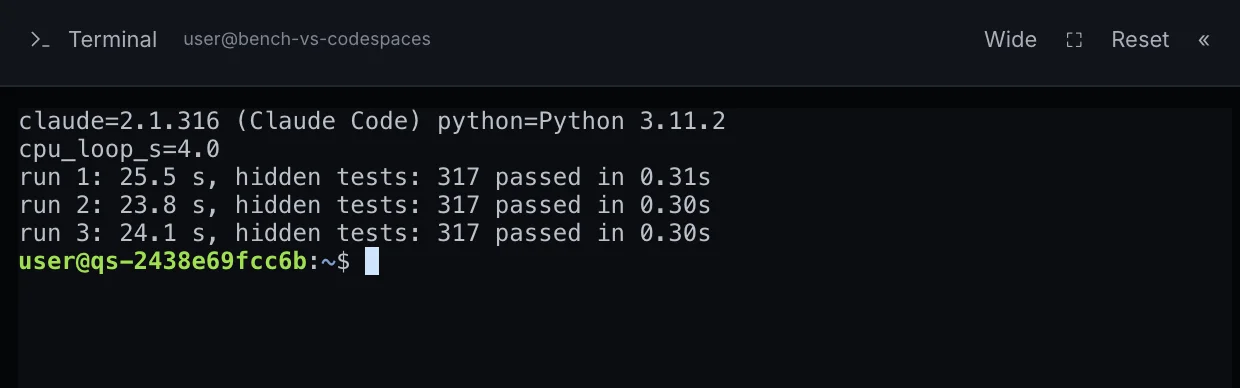
- The task itself ran at the same speed on both. Three runs of a 317-test refactoring task averaged 24.0 seconds on Codespaces and 24.5 seconds on Machines, and every run passed all hidden tests. The model and the API were the same, so the box made no real difference.
- Codespaces started faster. About 19 seconds from
gh codespace createto a working shell, against 35 seconds from clicking Create to a running Machine with its terminal open. - Machines needed no setup. On Codespaces we installed Claude Code, created an API key and wrote a settings file before the first task. On the Machine,
claudeworked as soon as the terminal opened. - Pause kept our processes only on Machines. A Codespace stop shut the container down: files stayed, the background job was gone. A Machine pause took 11 seconds, resume 7, and the job was still running afterwards.
- Price depends on GitHub's free quota. Codespaces is free until a personal account's monthly quota runs out, then $0.18 per hour for 2 cores. Machines is $0.02 per running hour from the first minute.
How we tested
| GitHub Codespaces | QuickSilver Machines | |
|---|---|---|
| Size | 2 cores, 8 GB RAM, 32 GB disk (basicLinux32gb) |
Standard: 2 vCPU, 4 GB RAM, 20 GB home disk |
| Region | West US 2 | US West (Santa Clara) |
| Image | github/codespaces-blank (Ubuntu 24.04, Python 3.14.2) |
Machines default (Python 3.11.2) |
| Claude Code | 2.1.318, installed by us | 2.1.316, preinstalled |
| Model | Claude Sonnet 5.5 through QuickSilver Pro | Claude Sonnet 5.5 through QuickSilver Pro |
Both boxes sent their AI requests to the same QuickSilver Pro API with the same model, so any difference in task time comes from the box, not the model. The Codespace first came up in Singapore, the default for our location. We deleted it and created it again in West US 2, so that both boxes were on the US west coast.
The task is the refactoring task from our coding agent benchmark: a long, copy-pasted build_report function has to be split into small helpers without changing its output for any input. A hidden suite of 317 tests, which the agent never sees, compares the result with the original function. One script ran it 3 times on each box, each time on a fresh copy of the repository:
claude -p --dangerously-skip-permissions --model claude-sonnet-5-5 --output-format json "$PROMPT"
The script also timed a fixed single-threaded Python loop, to compare raw CPU speed.
Getting to the first task
Codespaces. gh codespace create returned in 6 seconds, and the shell answered over SSH 14 seconds later, 19 seconds in total (17 for the first attempt in Singapore). Claude Code is not in the default image, so we installed it with the official installer, which took 32 seconds. Claude Code then needs a model provider. We created a QuickSilver Pro API key in the dashboard and wrote it to ~/.claude/settings.json:
{
  "env": {
    "ANTHROPIC_BASE_URL": "https://api.quicksilverpro.io",
    "ANTHROPIC_AUTH_TOKEN": "YOUR_QSP_KEY",
    "ANTHROPIC_DEFAULT_OPUS_MODEL": "claude-opus-5-5",
    "ANTHROPIC_DEFAULT_SONNET_MODEL": "claude-sonnet-5-5",
    "ANTHROPIC_DEFAULT_HAIKU_MODEL": "claude-haiku-5-5"
  }
}
With an Anthropic account you would sign in instead of using a key. Either way, it is a step you do once per Codespace, or once in a dev container that you maintain. One thing to watch: our first check, claude -p "Reply with ok", went to Claude Opus 5.5, Claude Code's default, and cost $0.030 for a one-word reply. Pass --model or set a default model if you do not want Opus.
Machines. We clicked Create Machine, and 35 seconds later the machine was Running with the terminal open. Claude Code, Codex, OpenCode and Hermes were already installed and signed in with the machine's own key, so we went straight to the task. The setup steps are in our Machines walkthrough.
Results
| Codespaces | Machines | |
|---|---|---|
| Create to working shell | 19 s | 35 s |
| Setup before the first task | Install Claude Code (32 s), create a key, write settings | None |
| Task run 1 | 24.9 s, 317/317 | 25.5 s, 317/317 |
| Task run 2 | 24.0 s, 317/317 | 23.8 s, 317/317 |
| Task run 3 | 23.1 s, 317/317 | 24.1 s, 317/317 |
| Python CPU loop | 4.3 s | 4.0 s |
| AI cost per run | $0.031 / $0.030 / $0.020 | $0.020 / $0.020 / $0.020 |
| Stop or pause | 58 s to Shutdown | 11 s to Paused |
| Start or resume | 24 s to a working shell | 7 s to Running |
| After resume | Files kept, background job gone | Files, shell variable and background job kept |
What the numbers say
The box is not the bottleneck. On Codespaces, Claude Code's own timing put 21 to 22.5 seconds of each 23 to 25-second run in API calls, and the hidden tests ran in a third of a second on both boxes. A faster box would not have made the agent noticeably faster. This holds for agent tasks like this one: a large build or test suite would feel the difference in CPU and RAM, and Codespaces has twice the RAM.
AI cost is a property of the model, not the box. All six runs cost 2 to 3 cents on Claude Sonnet 5.5. The two dearer Codespaces runs differ from the rest in their first request ($0.016 against $0.005 to $0.006), which looks like a prompt-cache write rather than anything the box did.
Setup is the real difference. On Codespaces we had to install the agent, get a key and configure it. A dev container can do this for you on every new Codespace, but someone has to write and maintain it, and the key or sign-in is still yours to manage. On Machines, the agents and the key come with the box, and machine time and AI usage come from one QuickSilver balance.
Pause behaves differently. Stopping a Codespace shuts the container down: your files survive, running processes do not. Pausing a Machine saves a checkpoint, so a long-running agent or dev server is still there when you come back. In our test the background job's log simply had a gap for the paused minute.
What it costs
Machines charges $0.02 per running hour, per minute, from your QuickSilver Pro balance, and nothing while paused. Our Machine was billed $0.0013 for about 4 minutes of running time.
Codespaces charges $0.18 per hour for a 2-core machine and $0.07 per GB-month of storage, but personal accounts get a monthly quota first: 120 core-hours and 15 GB-month on GitHub Free, 180 core-hours and 20 GB-month on GitHub Pro. A 2-core Codespace uses 2 core-hours per hour, so GitHub Free covers 60 hours a month of it. Our Codespace ran about 15 minutes, half a core-hour of the quota, and cost us nothing. Organizations get no free quota.
For an agent box used 2 hours a day on 22 working days (44 hours a month):
| Monthly cost | |
|---|---|
| Machines | $0.88 |
| Codespaces, within GitHub Free quota | $0.00 |
| Codespaces, quota used up or paid by an organization | $7.92 compute, plus storage |
AI usage is extra in every case. With Machines it comes from the same balance; with Codespaces it goes to whichever provider your agent uses.
Which one to pick
Codespaces makes sense when:
- your use fits in the free quota of a personal account;
- your work starts from a GitHub repository and you want VS Code in the browser;
- your team already has dev containers that install the tools you need.
Machines makes sense when:
- you would pay for Codespaces anyway, because the quota is used up or an organization pays: $0.02 against $0.18 an hour;
- you want Claude Code, Codex, OpenCode and Hermes ready without installing anything or handling keys;
- you want a full Linux desktop with Chromium next to the terminal;
- you pause and resume often and want running processes to survive.
Limits of this test
- One task, three runs per box, on one day. Times through a shared API vary from run to run.
- The two boxes are not the same size: Codespaces has 8 GB of RAM, Machines 4 GB.
- We timed Codespaces from the command line (
gh codespace createandgh codespace ssh) and Machines from the browser. Opening VS Code in the browser on Codespaces takes longer than an SSH shell. - The Codespace stop-and-start test was done over SSH, so we checked a background job but not a shell variable in an open terminal.
- Machines is in beta. It has one size, an 8-hour session limit and a 200-hour monthly cap, and no backup guarantee.
Run it yourself
The task is described in our coding agent benchmark; any task from your own repository works the same way with the claude -p command above. To try the Machine side, open Machines, create one and type claude in the terminal. To run Claude Code on your own computer or in a Codespace instead, follow our Claude Code setup guide.